> ## Documentation Index
> Fetch the complete documentation index at: https://dripart-chore-sync-comfy-api-v2-spec-462120c.mintlify.site/llms.txt
> Use this file to discover all available pages before exploring further.
# Qwen-Image-Edit-2511 ComfyUI ネイティブワークフローの例
> ComfyUI で Qwen-Image-Edit-2511 を使って画像を編集できます。キャラクターの一貫性が向上し、多人物編集、LoRA サポート、より強力な幾何学的推論に対応しています。
**Qwen-Image-Edit-2511** は、Qwen-Image-Edit-2509 の強化版であり、一貫性の大幅な向上を含む複数の改良が施されています。このモデルは、Qwen-Image 固有のテキストレンダリング機能を編集タスクへと拡張し、意味的および外観的な両面から精密なテキスト編集を可能にします。
**Qwen-Image-Edit-2511 の主な強化点**:
* **画像ドリフトの軽減**: 編集操作中の安定性が向上
* **キャラクターの一貫性の向上**: 創意工夫を伴う編集において、人物のアイデンティティおよび視覚的特徴をより適切に保持
* **多人物間の一貫性**: 複数の人物画像を高忠実度で融合し、自然なグループショットを生成
* **LoRA 機能の統合**: 人気のあるコミュニティ製 LoRA をベースモデルに直接組み込み
* **産業デザイン生成機能の強化**: 大量の工業製品設計およびマテリアル置換をより効率的にサポート
* **幾何学的推論能力の強化**: デザインやアノテーション用の補助構成線を直接生成
**公式リンク**:
* [GitHub リポジトリ](https://github.com/QwenLM/Qwen-Image)
* [Hugging Face](https://huggingface.co/Qwen/Qwen-Image-Edit-2511)
* [ModelScope](https://modelscope.cn/models/Qwen/Qwen-Image-Edit-2511)
* [技術報告書](https://qianwen-res.oss-cn-beijing.aliyuncs.com/Qwen-Image/Qwen_Image.pdf)
* [ブログ記事](https://qwenlm.github.io/blog/qwen-image-edit-2511/)
## Qwen-Image-Edit-2511 ComfyUI ネイティブワークフローの例
ComfyUI が最新版に更新されていることを確認してください。
* [ComfyUI のダウンロード](https://www.comfy.org/download)
* [更新手順](/ja/installation/update_comfyui)
このガイドで紹介するワークフローは、[ワークフローテンプレート](/ja/interface/features/template)から入手できます。
テンプレート内に該当のワークフローが見つからない場合、ComfyUI のバージョンが古くなっている可能性があります。
ワークフローを読み込んだ際にノードが欠落している場合の考えられる原因:
1. 最新の ComfyUI(Nightly 版)を使用していない
2. 起動時に一部のノードのインポートに失敗している
* [Cloud](https://cloud.comfy.org) は、ComfyUI の安定版リリース後に更新されます。
したがって、このドキュメントでコアノードが見つからない場合、それは新しいコアノードがまだ最新の安定版にリリースされていない可能性があります。次回の安定版リリースをお待ちください。
Qwen Image Edit 2511 - マテリアル置換
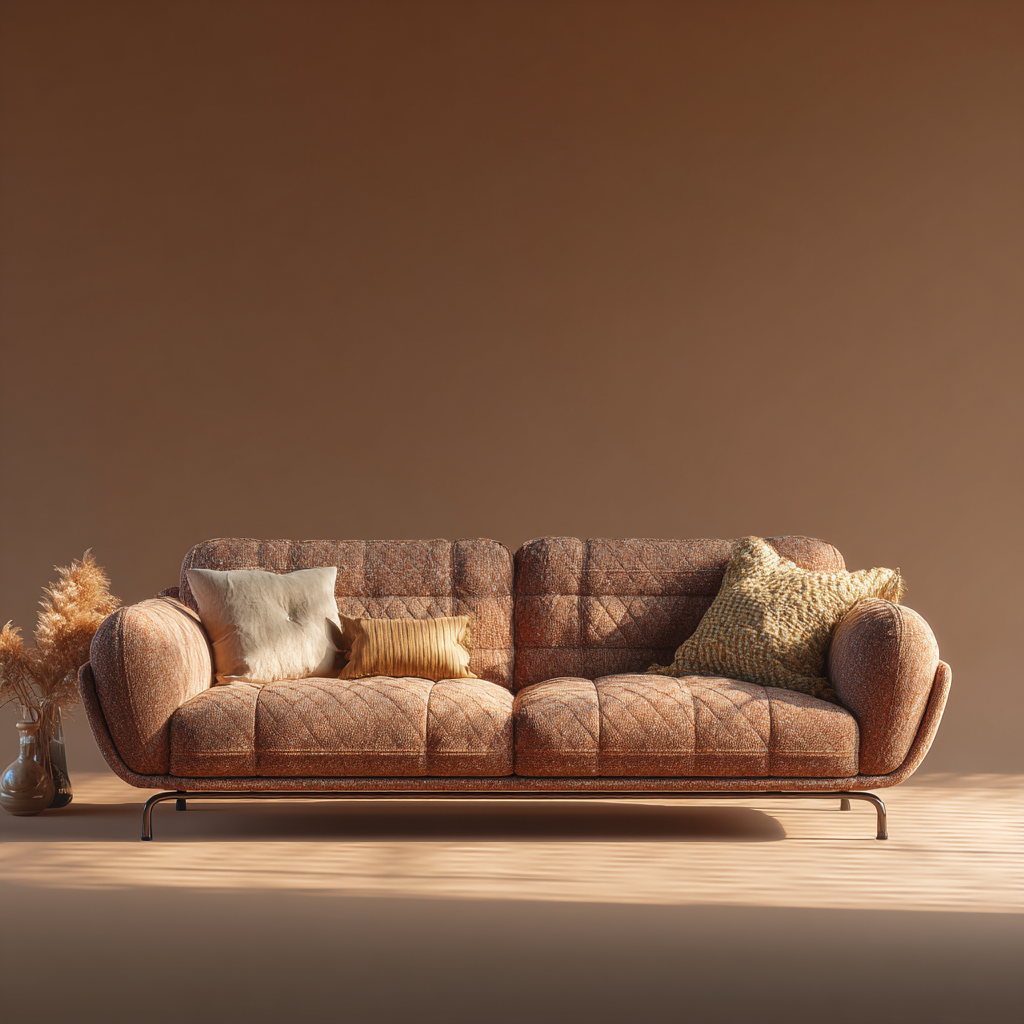
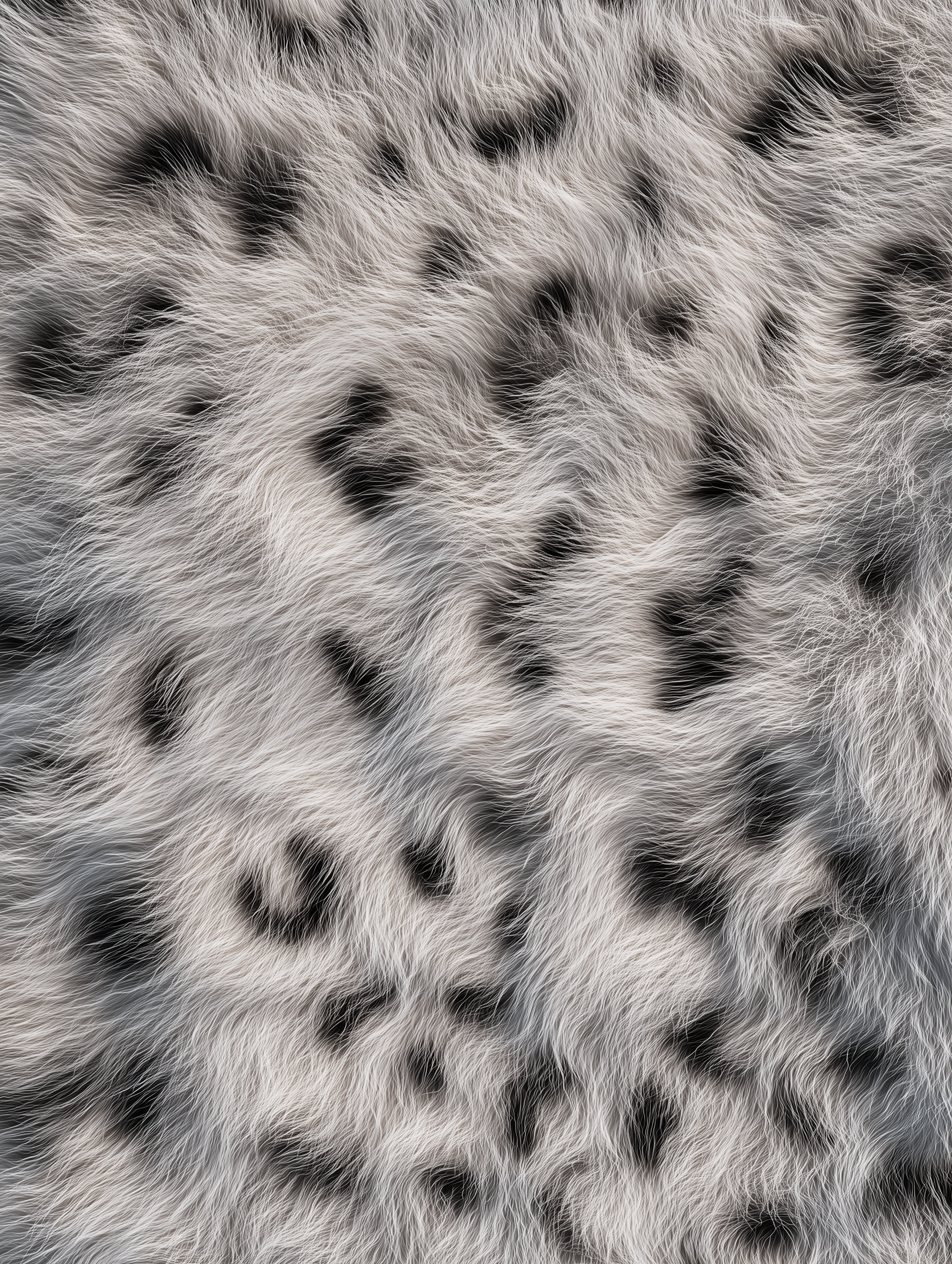
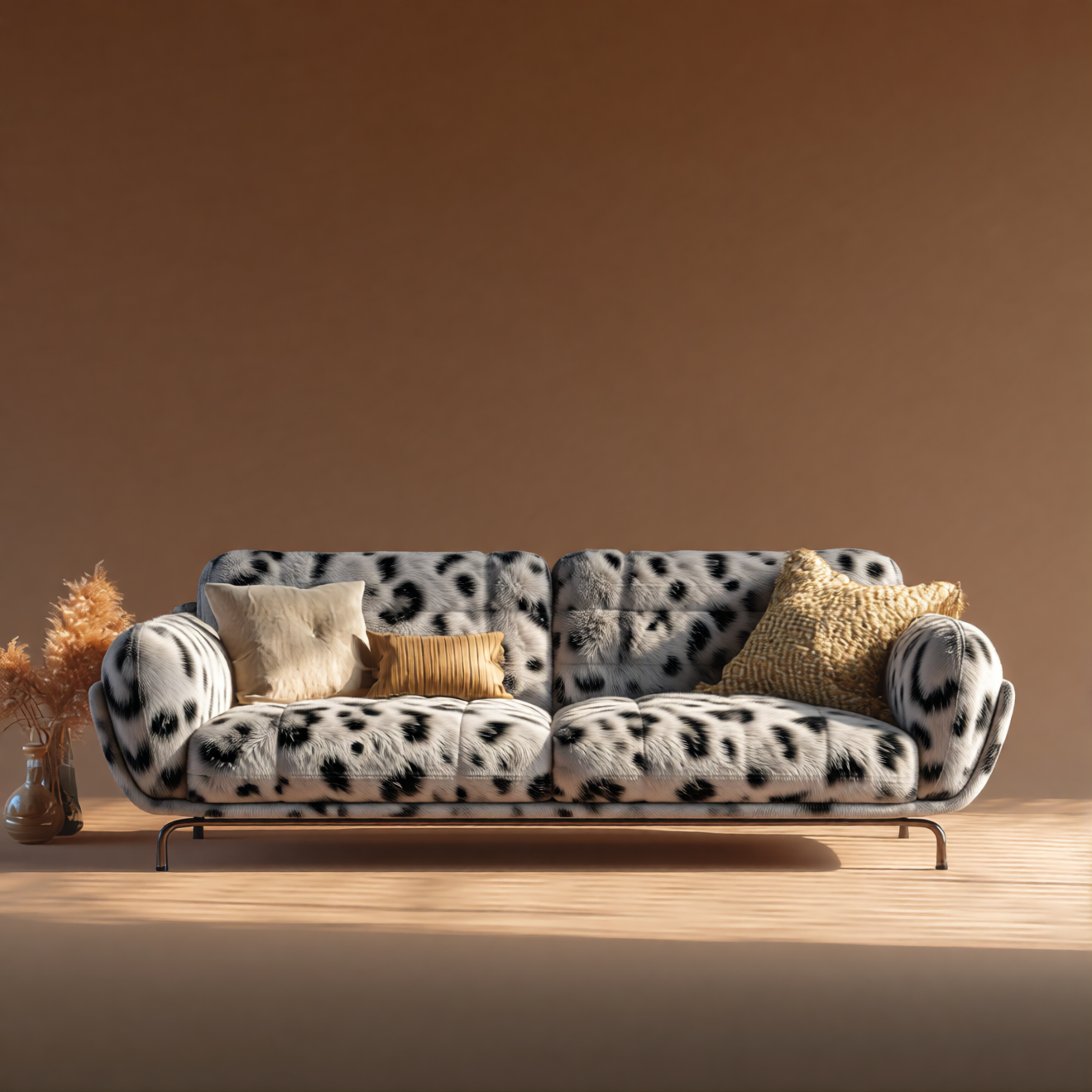
参照画像を Qwen-Image-Edit-2511 と組み合わせて、オブジェクト(例:家具)の素材を置き換えます。
 Comfy Cloud で開く
JSON をダウンロード、またはテンプレートライブラリで「Qwen-Image-Edit-2511」を検索
**入力マテリアル**
以下のファイルを対応する `LoadImage` ノードにアップロードしてください:
`LoadImage` ノード 41 · `leather_sofa.png`
`LoadImage` ノード 83 · `texture_fur.png`
**出力例**
### 1. ワークフローファイル
ComfyUI を更新した後、テンプレートからワークフローファイルを取得できます。あるいは、上のワークフロープレビューを ComfyUI にドラッグ&ドロップして読み込むこともできます。
### 2. モデルのダウンロード
**テキストエンコーダー**
* [qwen\_2.5\_vl\_7b\_fp8\_scaled.safetensors](https://huggingface.co/Comfy-Org/HunyuanVideo_1.5_repackaged/blob/main/split_files/text_encoders/qwen_2.5_vl_7b_fp8_scaled.safetensors)
**LoRA(任意:4 ステップ Lightning 加速用)**
* [Qwen-Image-Edit-2511-Lightning-4steps-V1.0-bf16.safetensors](https://huggingface.co/lightx2v/Qwen-Image-Edit-2511-Lightning/blob/main/Qwen-Image-Edit-2511-Lightning-4steps-V1.0-bf16.safetensors)
**拡散モデル**
* [qwen\_image\_edit\_2511\_bf16.safetensors](https://huggingface.co/Comfy-Org/Qwen-Image-Edit_ComfyUI/blob/main/split_files/diffusion_models/qwen_image_edit_2511_bf16.safetensors)
**VAE**
* [qwen\_image\_vae.safetensors](https://huggingface.co/Comfy-Org/Qwen-Image_ComfyUI/blob/main/split_files/vae/qwen_image_vae.safetensors)
**モデルの保存場所**
```
📂 ComfyUI/
├── 📂 models/
│ ├── 📂 text_encoders/
│ │ └── qwen_2.5_vl_7b_fp8_scaled.safetensors
│ ├── 📂 loras/
│ │ └── Qwen-Image-Edit-2511-Lightning-4steps-V1.0-bf16.safetensors
│ ├── 📂 diffusion_models/
│ │ └── qwen_image_edit_2511_bf16.safetensors
│ └── 📂 vae/
│ └── qwen_image_vae.safetensors
```
Comfy Cloud で開く
JSON をダウンロード、またはテンプレートライブラリで「Qwen-Image-Edit-2511」を検索
**入力マテリアル**
以下のファイルを対応する `LoadImage` ノードにアップロードしてください:
`LoadImage` ノード 41 · `leather_sofa.png`
`LoadImage` ノード 83 · `texture_fur.png`
**出力例**
### 1. ワークフローファイル
ComfyUI を更新した後、テンプレートからワークフローファイルを取得できます。あるいは、上のワークフロープレビューを ComfyUI にドラッグ&ドロップして読み込むこともできます。
### 2. モデルのダウンロード
**テキストエンコーダー**
* [qwen\_2.5\_vl\_7b\_fp8\_scaled.safetensors](https://huggingface.co/Comfy-Org/HunyuanVideo_1.5_repackaged/blob/main/split_files/text_encoders/qwen_2.5_vl_7b_fp8_scaled.safetensors)
**LoRA(任意:4 ステップ Lightning 加速用)**
* [Qwen-Image-Edit-2511-Lightning-4steps-V1.0-bf16.safetensors](https://huggingface.co/lightx2v/Qwen-Image-Edit-2511-Lightning/blob/main/Qwen-Image-Edit-2511-Lightning-4steps-V1.0-bf16.safetensors)
**拡散モデル**
* [qwen\_image\_edit\_2511\_bf16.safetensors](https://huggingface.co/Comfy-Org/Qwen-Image-Edit_ComfyUI/blob/main/split_files/diffusion_models/qwen_image_edit_2511_bf16.safetensors)
**VAE**
* [qwen\_image\_vae.safetensors](https://huggingface.co/Comfy-Org/Qwen-Image_ComfyUI/blob/main/split_files/vae/qwen_image_vae.safetensors)
**モデルの保存場所**
```
📂 ComfyUI/
├── 📂 models/
│ ├── 📂 text_encoders/
│ │ └── qwen_2.5_vl_7b_fp8_scaled.safetensors
│ ├── 📂 loras/
│ │ └── Qwen-Image-Edit-2511-Lightning-4steps-V1.0-bf16.safetensors
│ ├── 📂 diffusion_models/
│ │ └── qwen_image_edit_2511_bf16.safetensors
│ └── 📂 vae/
│ └── qwen_image_vae.safetensors
```